
GPSMarker
GPSMarker is a manufacturer of GPS tracking devices used in vehicle and asset monitoring. This page explains how GPSMarker devices work with Plaspy, what to expect from compatible hardware, and how to find the best device for your deployment. Use the device catalog below to navigate available models and their Plaspy integrations.
How GPSMarker devices work with Plaspy
Plaspy integrates with GPSMarker devices to collect location, movement, and status data and present it in a unified telematics dashboard. Typical data flows include secure device reporting to Plaspy servers and visualization of position history, geofences, and alerts. If you have GPSMarker hardware, Plaspy can be used to monitor live position, generate reports, and manage a fleet from a single interface.
Key integration points you can expect when pairing GPSMarker devices with Plaspy:
- Device reporting of GPS coordinates and basic sensor telemetry
- Configurable reporting intervals to balance accuracy and data usage
- Standard telematics features exposed through Plaspy for monitoring and reporting
Common features found in GPSMarker devices
While specific features vary by model, GPSMarker trackers commonly provide:
- GNSS based position tracking for vehicle and asset location
- Movement and ignition detection for basic fleet use cases
- Configurable reporting intervals for location and status updates
- Basic digital and analog inputs for external sensors These device capabilities map directly to Plaspy features so you can use location, motion, and sensor data in fleet workflows and reports.
Typical use cases for GPSMarker GPS trackers
GPSMarker devices are often used for:
- Vehicle fleet tracking and route monitoring
- Asset tracking for trailers and equipment
- Basic driver behavior and movement logging
- Theft recovery and location alerts for high value items
Plaspy provides the platform needed to translate GPSMarker data into actionable information such as trip logs, utilization reports, and alerting workflows.
Why choose Plaspy for GPSMarker device monitoring
Plaspy offers a flexible telemetry platform that makes it straightforward to add GPSMarker devices to your tracking setup. Benefits include:
- Centralized dashboard for mixed brand fleets including GPSMarker hardware
- Reporting and geofencing tools that consume GPS and sensor data
- Role based access and sharing options for operational teams Plaspy is designed to handle heterogeneous fleets so you can combine GPSMarker devices with other compatible trackers and manage them from a single system.
Help finding the right GPSMarker device
The BrandCatalog below lists GPSMarker models that are compatible with Plaspy. Use the catalog to:
- Compare device capabilities at a glance
- Open device specific documentation and connection notes
- Find manufacturer resources and purchase links on the GPSMarker site if needed
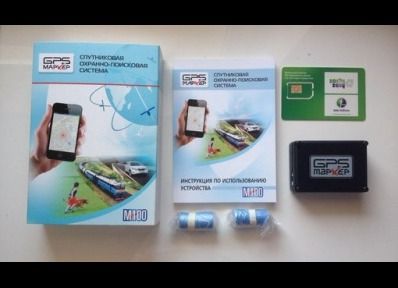


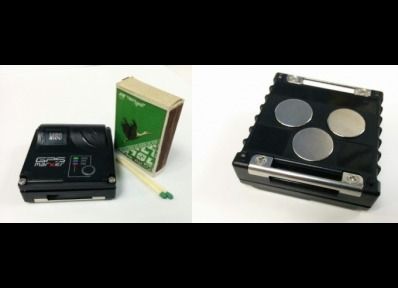
If you need guidance on selecting a device, consider your primary use case first:
- For vehicle fleets prioritize devices with ignition detection and frequent reporting
- For stationary asset tracking prioritize battery life and low power modes
- For mixed use consider models that support external sensors you plan to deploy
For more information about the brand itself, visit the GPSMarker website at https://gpsmarker.ru/.
Frequently Asked Questions
Q: What GPSMarker devices are compatible with Plaspy? A: Compatible GPSMarker models are listed in the BrandCatalog on this page. The catalog displays the specific models and links to further device details and setup notes.
Q: Can I use GPSMarker GPS trackers with Plaspy? A: Yes. Plaspy accepts telemetry from GPSMarker trackers that follow standard reporting protocols. After adding the device to your account and configuring reporting parameters, the device will send location and sensor data to Plaspy.
Q: Does Plaspy support fleet monitoring with GPSMarker devices? A: Plaspy supports fleet monitoring workflows that use GPSMarker telemetry for live tracking, trip reporting, geofencing, and alerting. Fleet features work across mixed fleets so GPSMarker devices can be managed alongside other tracker brands.
Q: Where can I find GPSMarker device documentation in Plaspy? A: Device specific documentation and configuration steps are available from each device entry in the BrandCatalog. Those entries include setup notes required to connect a GPSMarker device to Plaspy.
Q: Do I need special network settings to connect GPSMarker devices to Plaspy? A: Network and configuration needs can vary by model. Refer to the device entry in the catalog for required settings and consult GPSMarker documentation for device side configuration. Avoid sharing private server credentials in public documentation.
Q: How do I get help if my GPSMarker device is not sending data to Plaspy? A: First check device configuration and connectivity per the device entry in the catalog. If issues persist, contact Plaspy support or consult GPSMarker support resources for hardware troubleshooting.
Next steps and resources
Explore the models in the catalog to find the GPSMarker device that matches your needs. For platform information, feature lists, and commercial inquiries, visit Plaspy at https://www.plaspy.com. If you need assistance choosing a device or configuring a fleet, Plaspy support and documentation are available to help you get started.
Brand Compatibility
Monitor compatible brand devices with Plaspy
Plaspy helps businesses work with compatible GPS trackers for visibility, reporting, and daily operational control across vehicle and asset tracking workflows.