
VisionTek
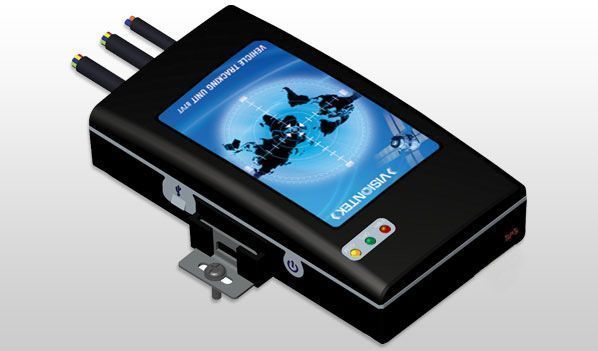
VisionTek produces hardware used in GPS tracking and telematics for vehicles and mobile assets. This brand page explains how VisionTek devices can be used with Plaspy, what to expect from the hardware in general terms, and how to choose the right device for your tracking needs. Use the visual catalog below to review compatible models and navigate to specific device documentation.
How VisionTek devices work with Plaspy
VisionTek GPS devices typically report location and sensor data over cellular networks. Plaspy receives and interprets those reports so you can view live location, history, and events in a single fleet management platform. Integration usually involves configuring the device to send telemetry to Plaspy using standard tracking protocols and the device's built in reporting options. Once connected, devices appear in your Plaspy account and can be managed alongside other compatible hardware.
Key integration points:
- Device reporting is processed by Plaspy to show positions, trips, and status on maps.
- Inputs and sensor readings forwarded by VisionTek devices are mapped to Plaspy telemetry fields for alerts and reports.
- Plaspy centralizes device configuration, alerting, and history for easier fleet operations.
Common features found in VisionTek devices
While specific features vary by model, VisionTek devices compatible with Plaspy commonly provide:
- GPS positioning and time stamped location data
- Cellular connectivity for real time tracking and telemetry
- Digital and analog inputs for external sensors and vehicle signals
- Configurable reporting intervals and power management options
- Support for event reporting used by Plaspy to trigger alerts and rules
This page does not list individual model specifications. Use the catalog component below to explore available VisionTek models and then open the device page for model specific details such as power requirements, sensor options, and installation notes.
Typical use cases for VisionTek GPS trackers
VisionTek devices are suited for many common tracking scenarios, including:
- Vehicle fleet tracking for route monitoring and driver accountability
- Asset tracking for high value equipment that requires periodic location updates
- Mobile workforce coordination where location and status updates improve dispatch
- Basic telematics where input signals (for example ignition or door status) inform operational decisions
Plaspy organizes incoming data from VisionTek devices into visual maps, reports, and alerts to support these use cases without forcing you to manage multiple tools.
Why choose Plaspy for VisionTek device monitoring
Plaspy is designed to work with a wide range of GPS hardware, and it adds value when monitoring VisionTek equipment by:
- Consolidating devices and data into a single dashboard for easier fleet oversight
- Providing configurable alerts and geofencing to respond to events promptly
- Offering reporting and history tools that help analyze usage and optimize operations
- Supporting APIs and integrations to feed location data into other business systems
Choosing Plaspy lets your operations team focus on insights from tracking data rather than device management overhead.
Help finding the right VisionTek device
Selecting the right VisionTek device depends on your installation and operational needs. Consider these factors before choosing:
- Power and mounting options: hardwired vehicle units vs battery powered asset trackers
- Reporting frequency and battery life trade offs for mobile assets
- Required inputs and sensor compatibility for vehicle telematics
- Coverage and cellular bands supported in your deployment region
To review compatible VisionTek models and their basic descriptions, browse the manufacturer catalog below. Each model links to its device page in Plaspy documentation where you can find setup guidance and configuration notes.
Frequently Asked Questions
Q: What VisionTek devices are compatible with Plaspy? A: The devices shown in the catalog above are compatible and can be configured to report to Plaspy. Visit each device page from the catalog to view compatibility notes and setup instructions.
Q: Can I use VisionTek GPS trackers with Plaspy? A: Yes. VisionTek devices that support standard GPS report protocols and cellular data can be connected to Plaspy for live tracking, history, and alerts. Follow the device configuration steps on the device documentation page to point telemetry to Plaspy.
Q: Does Plaspy support fleet monitoring with VisionTek devices? A: Plaspy supports fleet monitoring workflows such as map tracking, trip reports, geofencing, and alerts for VisionTek devices once they are configured to send data to the platform.
Q: Where can I find VisionTek device documentation in Plaspy? A: Click any VisionTek model in the catalog above to open its device page. Device pages include configuration guidance, common settings, and links to additional help resources.
Q: Do I need any special credentials to add VisionTek devices to Plaspy? A: Adding devices typically requires the device identifier and access to the device configuration interface. Specific steps are provided on each device documentation page in Plaspy.
Q: Can I use VisionTek trackers for asset tracking and not just vehicles? A: Yes. Depending on the model, VisionTek devices may be suitable for asset tracking. Check the device power and reporting capabilities to ensure they match your asset tracking requirements.
Next steps
Explore the VisionTek models shown in the catalog above to find the devices that meet your needs. Each model links to detailed setup instructions and Plaspy configuration guidance. For platform information and to get started with an account, visit https://www.plaspy.com.
If you need further assistance integrating VisionTek hardware with Plaspy, consult the device documentation pages or reach out to Plaspy support through the main website.
Brand Compatibility
Monitor compatible brand devices with Plaspy
Plaspy helps businesses work with compatible GPS trackers for visibility, reporting, and daily operational control across vehicle and asset tracking workflows.